Managing land ownership, verifying property boundaries, and conducting comprehensive legal due diligence have undergone a digital revolution in Central India. For anyone looking to purchase, sell, or finance real estate in Chhattisgarh, CG Bhuiyan represents the single most important administrative and legal portal. Developed by the National Informatics Centre (NIC) in collaboration with the Revenue Department of Chhattisgarh, Bhuiyan is an online land records computerisation database designed to provide seamless, transparent, and paperless access to vital property documents.
Historically, accessing land records required multiple visits to the local circle offices, relying heavily on manual registers managed by village Patwaris. This manual process was not only time-consuming but also prone to clerical errors, physical wear and tear, and transaction manipulation. Today, the CG Bhuiyan portal (bhuiyan.cg.nic.in) serves as a legally recognized, centralized platform that empowers citizens, banks, legal professionals, and farmers to instantly verify land records, track mutation status, and download digitally signed copies of ownership documents.
Whether you are a home loan applicant looking to satisfy bank documentation requirements, a prospective agricultural land buyer performing crucial due diligence, or a legal researcher evaluating title risks, this comprehensive guide will walk you through every aspect of the Bhuiyan ecosystem. We will examine the portal’s dual-system architecture, demystify B1 and P-II registers, provide precise step-by-step download guides, and dissect critical legal protections—such as Schedule V tribal land rules and Section 165 of the Chhattisgarh Land Revenue Code, 1959.
What is CG Bhuiyan?
In essence, CG Bhuiyan is the official digital land governance framework of the state of Chhattisgarh. The term Bhuiyan translates to “land” or “earth” in Hindi, representing the portal’s role as the digital repository of all registered land parcels in the state. By computerizing the land revenue administration, the Chhattisgarh state government has digitized millions of land holdings, mapping them to unique identifiers that link owners directly to their spatial and alphanumeric properties.
For property owners and prospective buyers, the portal acts as a transparent, public-facing ledger. It minimizes information asymmetry in real estate transactions, allowing users to verify ownership claims without intermediaries. By offering both general public access and secure administrative login portals for revenue officials (such as Tehsildars, Revenue Inspectors, and Patwaris), CG Bhuiyan ensures that land transactions, ownership updates, and boundary rectifications are recorded systematically in an audit-ready digital system.
Understanding the Dual-Component System: Bhuiyan vs. Bhu-Naksha
The digital land governance ecosystem in Chhattisgarh is structured as a dual-component platform, separating alphanumeric text records from spatial graphical representations to ensure data integrity and system efficiency. These two databases work in unison:
Bhuiyan (Alphanumeric Property Database)
The alphanumeric database, hosted on bhuiyan.cg.nic.in, is dedicated entirely to textual land records. It serves as the primary engine for Record of Rights (RoR) checks, containing documents such as the B1 Khatauni (the owner’s account register) and P-II Khasra (the plot-level register). This system manages landholder details, unique account numbers, tax liabilities, mutation histories, and active encumbrances.
Bhu-Naksha (Spatial Cadastral Mapping)
The spatial mapping database, hosted on bhunaksha.cg.nic.in, manages and visualizes digitized cadastral maps. A cadastral map represents the precise, scale-accurate geographic boundaries of individual land parcels. Through this system, users can overlay geographic coordinate systems, view parcel dimensions and shapes, check adjoining plot numbers, and cross-reference physical boundary layouts against the state’s official digital maps.
Difference Between Bhuiyan, Bhu-Naksha, and NGDRS / E-Panjiyan
When conducting property transactions in Chhattisgarh, users often confuse the roles of different state portals. It is legally and practically essential to understand which platform to use for specific administrative tasks:
| Parameter | CG Bhuiyan | CG Bhu-Naksha | NGDRS / E-Panjiyan |
|---|---|---|---|
| Primary Portal URL | bhuiyan.cg.nic.in | bhunaksha.cg.nic.in | epanjeeyan.cg.gov.in |
| Document Types | B1 Khatauni, P-II Khasra (RoR) | Cadastral maps (F-Line, plot map) | Registered Sale Deeds, Gift Deeds, Wills |
| Core Purpose | Verifying property ownership, tax status, and checking land classifications. | Verifying parcel boundaries, physical shapes, and checking neighboring plots. | Calculating stamp duty, property valuation, and registering deeds. |
| Legal Stage | Pre-purchase due diligence and post-purchase title mutation checks. | Geographic and physical site boundary verification before purchase. | Executing and registering the transfer of property title. |
| Access Fees | Free online viewing and QR-verified PDF downloads. | Free online viewing and spatial report prints. | Registration fees and stamp duty applicable based on circle rates. |
While Bhuiyan and Bhu-Naksha maintain the updated records of land rights and boundaries, the National Generic Document Registration System (NGDRS), integrated with E-Panjiyan, is the transactional gateway where deed registrations, property valuations, and stamp duty payments are processed. Once a deed is registered on NGDRS, the transaction data is pushed to Bhuiyan to trigger the land mutation process.
Alphanumeric Property Records: B1 Khatauni & P-II Khasra Explained
To navigate the CG Bhuiyan portal effectively, one must understand the anatomy of the two primary alphanumeric documents that form the cornerstone of land revenue administration in Chhattisgarh: the B1 Khatauni and the P-II Khasra.
B1 Record (Record of Rights)
The B1 Khatauni is the ultimate consolidated account statement of a landholder’s agricultural and non-agricultural holdings within a specific village revenue circle. It does not merely describe a single plot; rather, it lists every single parcel of land registered under a unique owner’s name or family khata (account) within that village’s jurisdiction.
What Details Does a B1 Document Contain?
A certified B1 Khatauni is divided into several administrative columns, each recording crucial legal information:
- Khata Number (Account Identifier): A unique number assigned to the landholder’s overall account in that village.
- Landholder Information: The full name of the registered owner(s), father/husband’s name, caste, and share of ownership if the land is held jointly.
- Khasra Numbers: A comprehensive list of all plot numbers linked to this specific khata.
- Area Details: The precise geographical area of each plot, calculated in hectares or acres.
- Land Revenue & Cess: The annual tax (Lagaan) and local cess levied on the land holdings.
- Land Classification: Denotes whether the land is private (Bhumiswami), government-owned, or forest land.
Interpreting the ‘Bhar’ (Encumbrance) Column
One of the most critical sections on the B1 Khatauni is the “Bhar” (burden or liability) column. This column records active encumbrances. If a landowner has taken an agricultural loan, secured a home loan by mortgaging the property, or if the land is involved in an active court dispute, the revenue department writes a formal note here. For banks and property buyers, a clear, unencumbered “Bhar” column is an absolute prerequisite before any loan approval or sale transaction can proceed.
P-II Khasra (Plot-level Register)
Unlike the B1 Khatauni, which is an owner-centric statement, the P-II Khasra is a plot-centric register. Every single registered plot in Chhattisgarh has its own dedicated P-II Khasra sheet. This document is structured into distinct sections, primarily Khand 1 and Khand 2:
Khand 1 (Core Plot Description)
This section houses the permanent geographical and physical specifications of the plot. It records the unique Khasra number, the name of the active landholder, the precise area, the soil classification, and whether the parcel is categorized for agricultural, residential, commercial, or institutional use.
Khand 2 (Seasonal Crop & Sowing Inspection)
This section functions as an active, seasonal log of the plot’s agricultural productivity. It is updated biannually by the village Patwari during field inspections. It details the exact crops sown (e.g., Paddy, wheat, pulses) across different crop cycles (Kharif and Rabi), irrigated versus unirrigated areas, and the source of irrigation water (e.g., tube well, canal, rain-fed). This data is crucial for farmers applying for Pradhan Mantri Fasal Bima Yojana (PMFBY) crop insurance claims, obtaining government minimum support price (MSP) crop procurement benefits, and validating eligibility for state agricultural subsidies.
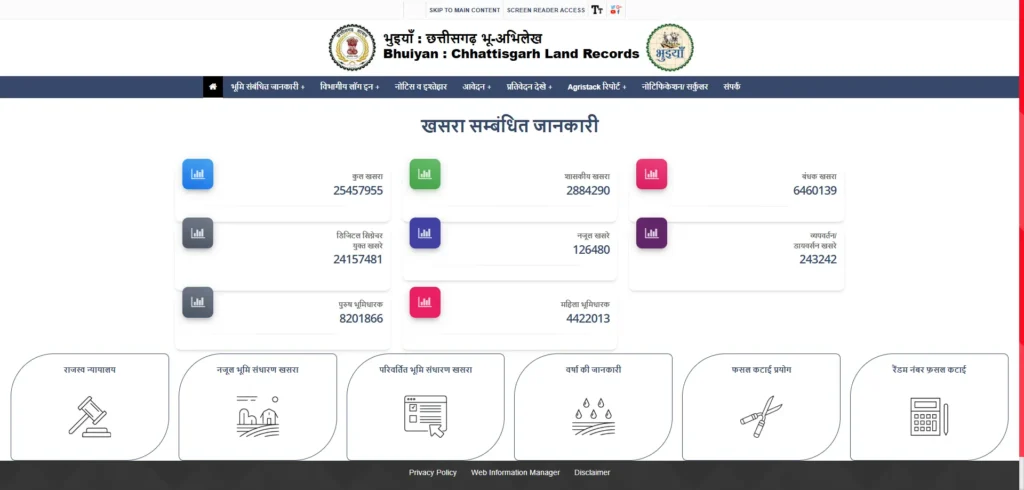
Step-by-Step: How to Check and Download Land Records on bhuiyan.cg.nic.in
The CG Bhuiyan portal has been optimized to allow citizens to check and download certified land records without requiring complex technical skills. Below are the detailed step-by-step instructions to access these records.
Checking Chhattisgarh Land Records by Khasra Number
If you know the specific plot number (Khasra) of the property you want to verify, follow these steps to retrieve the land records:
- Navigate to the Official Portal: Open your web browser and go to the official URL:
bhuiyan.cg.nic.in. - Access the Document Retrieval Section: On the homepage, locate the primary menu and click on the option labeled “B1/PII प्राप्त करें” (Get B1/P-II).
- Enter Administrative Jurisdiction: A selection screen will appear. Choose the correct administrative details from the dropdown menus:
- District (जिला)
- Tehsil (तहसील)
- RI Circle (रा.नि. मण्डल)
- Village (ग्राम)
- Select Search Method: Once the village is selected, choose the “Khasra-wise” (खसरा वार) search filter option.
- Enter Khasra Number: Input the precise plot/Khasra number into the search field and click “Search” / “खोजें”.
- View Alphanumeric Record: The system will populate the matching record on the screen, displaying the owner’s name, parentage, area, and any registered notes.
Land Record Search by Name in Chhattisgarh (Without Khasra)
If you are a buyer or legal researcher and do not have the specific plot number, you can perform a search using the landowner’s name:
- Open the Portal and Select Village: Repeat Steps 1 to 3 above to enter the specific Village jurisdiction.
- Select Name Search Filter: Instead of choosing Khasra-wise, click on the “Bhuswami Name” (भूमिस्वामी का नाम) or “Name-wise” search filter option.
- Enter Landowner Name: Input the landowner’s name in Devanagari script.
- Usability Tip: The portal uses Unicode Devanagari script. If you type in English, the system may not recognize the characters. Use the on-screen virtual keyboard or an online English-to-Hindi transliteration tool to paste the name in Hindi.
- Initiate Search: Click on the search button. The portal will display a list of all landowners matching that name or starting with those letters in that specific village.
- Select the Correct Owner: Scroll through the list, verify parentage (father’s or husband’s name), and click on the correct profile to retrieve the associated land records.
Downloading Digitally Signed B1 and P-II PDFs
For official, legal, and banking transactions, standard screen prints do not hold statutory weight. You must download a digitally signed PDF copy:
- Select the Digital Download Tab: Under the retrieved land details on the portal, locate the tab labeled “डिजिटल हस्ताक्षरित B1/P-II आवेदन” (Digitally Signed B1/P-II Application).
- Choose Document Version: Select the specific document you require:
- Digitally Signed B1 Khatauni (for ownership and consolidation)
- Digitally Signed Khasra P-II (Khand 1) (for plot-level dimensions and title)
- Khasra P-II Khand 2 (for agricultural and crop details)
- Provide Contact Details: Enter your mobile number and email address. This contact registration is mandatory for auditing and downloading digitally certified documents.
- Generate Certified Document: The portal’s server will compile the record and overlay a digital signature from the Revenue Department’s authorized certification authority.
- Download PDF: Click the generated download link to save the PDF. This document contains a certified QR code at the bottom, which can be scanned by any third party to instantly verify its authenticity against the state database.
Downloading via the Bhuiyan Mobile App (v3.4.7+)
For users on mobile devices, the official Bhuiyan Mobile App (available on Google Play) provides a streamlined interface. The latest version (v3.4.7+) requires OTP (One-Time Password) verification on your registered mobile number. The app allows you to download and store QR-enabled B1 and P-II PDFs directly on your smartphone, making it highly convenient for farmers and field agents during boundary audits.
Critical Rendering Tip: Install Hindi ‘Mangal’ Font
A major frustration reported by users downloading digitally signed PDFs on Windows, Android, or macOS devices is that the text displays as empty boxes, question marks, or garbled text. This occurs because the local system does not have the mandatory Hindi Unicode ‘Mangal’ font installed. To resolve this:
- Install the Mangal font or enable Hindi language packs in your operating system settings.
- Open the PDF inside standard Google Chrome or an updated version of Adobe Acrobat Reader, which has built-in support for digital signatures and Devnagari Unicode rendering.
Land Mutation Tracking and Applications on Bhuiyan
A land title is never truly secure until it has undergone the process of Mutation (Namantaran). Mutation is the formal process of updating the land revenue records to reflect a change in ownership. When a property is sold, inherited, or gifted, the buyer must register the deed at the Sub-Registrar Office (SRO) and apply for mutation in the Bhuiyan database to ensure they are recorded as the legal taxpayer and owner of the land.
How to Check CG Bhuiyan Mutation Status Online
Monitoring the progress of your mutation application is crucial to ensure there are no administrative delays or objections filed by third parties. To track your mutation status online:
- Visit the Portal: Go to the official CG Bhuiyan homepage (
bhuiyan.cg.nic.in). - Access Mutation Tracker: Select the menu option labeled “नामांतरण की वर्तमान स्थिति” (Current Status of Mutation).
- Select Search Parameter: You can search using three distinct tracking parameters:
- Application Number (आवेदन संख्या): Provided at the citizen service center (CSCs) or online citizen portal upon submission.
- Deed Registration Details: Input the registration number and date from your SRO registered Sale Deed.
- Khasra Number (खसरा संख्या): Input the specific plot number to view if any mutation proceedings are active.
- View Processing Stage: The portal will display the exact step of your application:
- Pending at Patwari: Field verification and public notice issuance stage.
- Pending at Tehsildar: Under review by the Naib Tehsildar/Tehsildar for final approval.
- Approved/Rejected: Denotes final resolution. If approved, the online B1/P-II will reflect your name as the new owner.
How to Apply for Land Mutation Online
The Revenue Department of Chhattisgarh has integrated mutation filing through the Citizen Facility Portal. Property owners no longer need to submit physical files manually at the Tehsil office:
- Register on the Citizen Portal: Access the citizen services section on CG Bhuiyan and create a user profile using your Aadhaar or mobile number.
- Fill the Application Form: Provide details of the seller (previous owner), the buyer (new owner), the village jurisdiction, the registered deed number, and the specific Khasra numbers.
- Upload Mandatory Documents: You must upload clear scanned copies of:
- Registered Sale Deed, Gift Deed, or Succession Certificate.
- Latest B1 and P-II documents of the seller.
- Identity proof of the applicant (Aadhaar Card, PAN, Voter ID).
- Recent property tax receipt.
- Pay Nominal Processing Fee: Pay any applicable administrative charges through the integrated net banking/UPI payment gateway.
- Patwari Field Verification & Public Notice: Once submitted, the system automatically routes the file to the circle Patwari. A public notice (Udghoshna) is issued in the village, inviting objections within a mandatory 15-day window.
- Tehsildar Resolution: If no objections are raised and the documents are legally valid, the Naib Tehsildar or Tehsildar signs off on the mutation order. The digital records are updated, and your name is formally inscribed as the new Bhumiswami.
Crucial Legal Protections & Buyer Risks in Chhattisgarh
While the digitization of land records has made property verification straightforward, buying land in Chhattisgarh carries serious legal risks. Failing to perform exhaustive legal due diligence can result in the transaction being declared void, resulting in total loss of your financial investment.
Buying Land in Schedule V Protected Areas (Section 165(6))
A significant portion of Chhattisgarh falls under Schedule V of the Constitution of India, which provides special administrative and legal protections to indigenous tribal populations. These constitutional protections are enacted through Section 165 of the Chhattisgarh Land Revenue Code, 1959.
Prior Mandatory Collector Permission
According to Section 165(6) of the Chhattisgarh Land Revenue Code, 1959, any agricultural land owned by an individual belonging to an aboriginal (Scheduled Tribe) community cannot be transferred, sold, leased, or mortgaged to a non-tribal person without prior written permission from the District Collector.
Obtaining this permission is a complex legal process where the Collector must be satisfied that the sale is not being executed under duress, coercion, or financial exploitation. Any sale deed executed without this prior written consent is legally void ab initio (invalid from the beginning).
Reversion Risks Under Section 170-B
To enforce the protections of Section 165(6), the state legislature enacted Section 170-B in the Land Revenue Code. This section gives revenue courts (and District Collectors) the power to investigate historical land transactions. If it is discovered that a non-tribal person has acquired tribal land in violation of Section 165(6), the transaction is declared void, and the land is reverted back to the original tribal owner or their legal heirs.
The most dangerous aspect for buyers: There is no limitation period under Section 170-B. A transaction executed twenty, thirty, or forty years ago can be challenged and reverted today if it is found to have violated Section 165(6). In the landmark precedent State of Chhattisgarh vs. Munna (High Court of Chhattisgarh, 2022), the court strongly reaffirmed that tribal land protections under Section 170-B are absolute, and non-tribal occupiers cannot claim adverse possession or immunity due to the passage of time.
Prohibition on “Benami” Tribal Employee Transactions
A common fraudulent practice in Chhattisgarh involves non-tribal corporate entities or wealthy individuals using a tribal employee, driver, or proxy as a front (“Benami”) to purchase agricultural land in protected areas.
Under the Land Revenue Code and Indian Benami transactions prohibition acts, this is a severe criminal offense. If discovered, the transaction is declared void under Section 165/170-B, the property is confiscated by the state government with no compensation to the buyer, and the parties involved face prosecution. The High Court of Chhattisgarh has maintained a zero-tolerance policy against proxy transactions designed to bypass Section 165(6).
Technical Troubleshooting and Common Portal Issues
Despite the robust design of the CG Bhuiyan portal, users occasionally encounter technical glitches, discrepancies, and operational delays. Understanding how to troubleshoot these issues is essential for seamless land management.
Data Synchronization Lag
A common mistake made by property buyers is assuming that the online Bhuiyan portal reflects land details in real-time. In practice, there is a data synchronization lag between different government systems:
- Deed Registration: A sale deed is registered at the Sub-Registrar Office (SRO) via the NGDRS portal.
- Local Intimation: The registered data is pushed digitally to the Tehsil office.
- Patwari Verification: The Patwari processes the physical mutation file.
- Portal Update: Once the Tehsildar approves, the database is updated.
This entire pipeline can take anywhere from a few days to several weeks. During this period, the online portal may still show the previous owner’s name. The Fix: Never rely solely on an online printout during active property transactions. Always request a fresh, physical certified copy (Nakal) from the local Tehsil office, formally stamped and signed by the Naib Tehsildar or Patwari. This physical copy holds immediate legal and statutory validity.
Discrepancies Between Digital Maps and Physical Realities
Another frequent issue is a discrepancy between the cadastral boundaries shown on the CG Bhu-Naksha portal and the actual physical boundaries of the plot. Digital maps were compiled by scanning legacy paper maps. If the original paper maps contained distortions, those errors are reproduced on the digital portal.
Recommended Action:
- Before finalizing a land purchase, execute a Physical Boundary Audit (Simankan).
- Apply online via CG Bhuiyan for a formal boundary measurement by a government-licensed surveyor.
- The surveyor will visit the site with modern electronic total stations (ETS) or GPS equipment, cross-referencing physical coordinates with the official revenue map sheets.
- If a discrepancy is found, file a map correction request (Naksha Shodhan) under the Land Revenue Code to update the digitized Bhu-Naksha map.
Frequently Asked Questions (FAQs) About Bhuiyan
To help you find quick answers, here are the most common queries regarding the CG Bhuiyan portal:
Is there a fee to check or download land records on Bhuiyan CG?
No. Accessing, searching, and downloading standard or digitally signed B1 Khatauni and P-II Khasra records on bhuiyan.cg.nic.in is completely free of cost for all citizens.
Can an online printout of the Bhuiyan record be used as proof of ownership in court?
A standard webpage printout holds no legal weight in a court of law. To use these records for legal, banking, or official disputes, you must present either a digitally signed PDF with a verified NIC QR code, or a certified physical copy stamped and signed by the authorized Naib Tehsildar or Patwari.
What is the official mobile application for CG land records?
The official mobile application is Bhuiyan, developed by the National Informatics Centre (NIC) and available on the Google Play Store. Ensure you download only the official application published by NIC to safeguard your privacy and access authentic records.
How do I resolve spelling mistakes or incorrect area entries in my online record?
If there are discrepancies between your physical title deeds and the online database, file an online correction application on the Bhuiyan portal under the “Record Correction” (अभिलेख दुरुस्ती) tab. You must upload your original SRO-registered sale deed as supporting evidence. Alternatively, you can submit a physical application to the local Tehsildar, who will direct the Patwari to verify the records and update the database.