Buying property or verifying land holdings in the picturesque hill state of Uttarakhand is often considered an arduous process due to its complex topography, which spans high-altitude mountains and narrow river valleys. For decades, land record maintenance in the region was seen as a troublesome issue. Most record-keeping centres were plagued with chronic problems, including administrative mismanagement, a lack of transparency, and data manipulation. Citizens, farmers, and prospective buyers were routinely troubled, as retrieving even trivial land-related information required a physical trip to the local Tehsil office and a waiting period of several hours.
Thankfully, India’s digital boom emerged as a saviour from this predicament. Under the centralized vision of the Digital India Land Records Modernization Programme (DILRMP), the Government of Uttarakhand launched the Bhulekh UK portal. Operated and maintained by the Revenue Department of Uttarakhand, this online gateway has completely transformed land record access, bringing unprecedented transparency, speed, and reliability to the state’s digital administration. Today, users can instantly access critical documents like the Record of Rights (ROR), track mutation proceedings, view village maps, and verify land ownership from the comfort of their homes.
Whether you are looking to purchase a hill-facing plot in Nainital, buy a flat in Dehradun, or secure a home loan, this comprehensive guide will walk you through the entire digital ecosystem of the Bhulekh Uttarakhand portal.
What is Bhulekh UK (Devbhoomi Bhulekh)?
The Bhulekh UK portal (officially hosted at bhulekh.uk.gov.in) is the centralized digital repository for all land and revenue records across the state of Uttarakhand. Formally introduced to minimize citizen dependency on physical visits to government offices, the platform serves as a 24/7 online window into the state’s land administration. The technical architecture of the portal is designed to provide seamless, multi-user access to a database containing approximately 1.5 million digitized Record of Rights (RoR) records across all thirteen districts of the state.
To support these administrative workflows, the Board of Revenue Uttarakhand introduced the New Bhulekh Software. This software transition is governed by a strict technical checklist to ensure data integrity during system upgrades and to standardize the digital entry of land data. Through the portal, users can check ownership details, khasra numbers, khatauni records, village maps, and mutation status for any piece of land in the state. The portal covers major districts, including Dehradun, Nainital, Haridwar, Udham Singh Nagar, and Pauri Garhwal. However, users should note that data completeness varies depending on the level of digitisation in each Tehsil. Some remote, hilly patwari circles still have gaps, meaning older rural khasra records may require manual verification at the Tehsil level.
Is Devbhoomi Bhulekh Different from Bhulekh UK?
A common source of confusion among property buyers is the distinction between “Devbhoomi Bhulekh” and “Bhulekh UK.” In reality, both terms refer to the exact same official system. The Government of Uttarakhand frequently uses “Devbhoomi” (meaning “Land of the Gods,” a popular moniker for Uttarakhand) to brand its online land governance framework.
Thus, whether a document or portal refers to the Devbhoomi Bhulekh Uttarakhand portal or the Bhulekh UK portal, they are both pointing to the database accessed via bhulekh.uk.gov.in.
Understanding Key Land Record Terms in Uttarakhand
To successfully navigate the Bhulekh UK portal, one must understand the unique revenue terminology used in Northern India and Uttarakhand. Entering correct identifiers is the single most important step in getting accurate results. A single incorrect field—such as a wrong village name or transposed digits—will return no results or, worse, retrieve a completely different plot’s details.
The Difference Between Khasra, Khata, and Khatauni
The revenue system in Uttarakhand is organized around three primary numbers that identify plots, accounts, and consolidated landholdings:
- Khasra Number (Gata Number): The Khasra number is a unique survey or plot number assigned to a specific parcel of land in a village. It is the basic unit of land measurement and revenue mapping. When you view a village map (Sajra), each individual boundary line forms a polygon, which is identified by its Khasra number. It confirms the physical plot area, soil type, crop details, and land-use classification.
- Khata Number: The Khata number is an account number assigned to a specific landowner or a group of co-owners (Khatadhars) who jointly hold land in a village. If a family jointly owns multiple plots within the same village, they are assigned a single Khata number that acts as their unified revenue account identifier.
- Khatauni Number: The Khatauni is a consolidated ledger or record of landholdings belonging to an individual or family within a specific village. It is the consolidated sheet of all Khatas and represents the complete operational document of land ownership. The Khatauni ledger details who owns the land, the share of each co-owner, and whether there are any registered mortgages, liabilities, or disputes on the property.
- Khewat Number: Often confused with the Khata number, the Khewat number is an account number assigned to the co-sharers or owners of a larger revenue estate. It is a critical identifier when clarifying hierarchical ownership or division of collective ancestral estates.
To summarize their differences, consider this quick-reference comparison table:
| Term | Level of Detail | Primary Purpose | Key Information Contained |
|---|---|---|---|
| Khasra Number | Plot / Parcel Level | Land Identification | Plot boundaries, total physical area, land-use category. |
| Khata Number | Owner Account Level | Revenue Accounting | Unified account identifier for single or joint owners in a village. |
| Khatauni Number | Village Ledger Level | Ownership Proof | Consolidated ownership shares, title status, mortgages, liabilities. |
| Khewat Number | Co-sharer Estate Level | Multi-owner Division | Identifies proportional shares in a larger collective land estate. |
What is the Public ROR (Record of Rights)?
The Record of Rights (ROR), locally called the Nakal or Jamabandi, is the ultimate legal document that establishes the current ownership, title, and liabilities of a land parcel in Uttarakhand. When you view the “Public ROR” on the Bhulekh UK website, you are retrieving the live database version of the Khatauni ledger.
The ROR is the primary document that buyers, banks, and legal advisors check first. It provides a snapshot of “who owns what right now,” which is crucial because a standard sale deed only shows the history of how ownership arrived, whereas the ROR shows the current, active legal standing.
How to Check Land Records on Bhulekh UK (Step-by-Step)
Retrieving your land records on the Bhulekh Uttarakhand (Devbhoomi) portal is free for online viewing and can be completed in under five minutes. Follow this step-by-step guide to download your land records online.
Step 1: Navigating the Official Gateway
- Open your web browser and navigate to the official website: bhulekh.uk.gov.in. Avoid third-party or unofficial portals, as they expose you to potential data theft and fraud.
- The homepage is available in both English and Hindi to facilitate wider access.
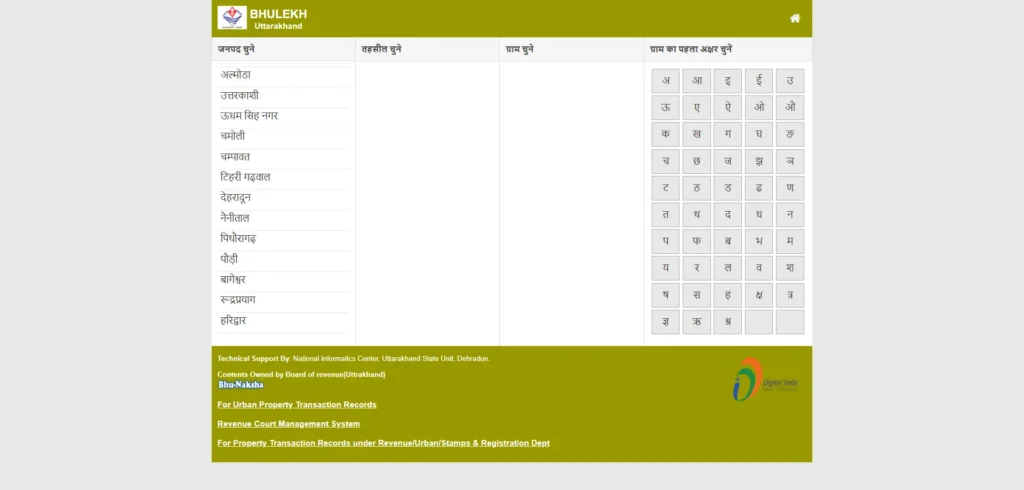
- On the homepage, locate and click on the “Public ROR” option, which is positioned prominently in the menu. No citizen login or registration is required to view these public records.
Step 2: Selecting Geographic Location
Once you enter the Public ROR section, you will be presented with a structured geographic selection screen. You must narrow down your search by selecting:
- District: Select your target district from the state-wide list of 13 districts (e.g., Dehradun, Nainital, Haridwar, Pauri Garhwal).
- Tehsil: Select the local revenue jurisdiction or block where the plot is recorded (e.g., Dehradun Sadar, Vikasnagar, Chakrata, Sult, Dwarahat).
- Village: Select the specific revenue village from the alphabetical list. If you do not see your village, it may indicate that the area is still undergoing digitisation.
Step 3: Choosing a Search Identifier
After selecting the village, the portal will load the search console. You can retrieve the ROR by choosing one of the following search tabs:
- Search by Gata/Khasra Number: Enter the unique plot number in the field and click search.
- Search by Khata Number: Enter the specific land account number if you have a copy of a previous tax bill or deed.
- Search by Khatadhar (Owner Name): This option is highly useful when plot numbers are unknown. Select “Search by Name,” and use the on-screen phonetic Devanagari (Hindi) keyboard to type the first few characters of the owner’s name. Always type phonetically using the precise spelling recorded in the physical deeds.
- Search by Registry Details: Select “By registry” from the top menu, enter the computerized registry number generated during property registration, and click search. This is highly useful for verifying if a recent purchase has been updated on the portal.
Once the matching record is displayed, click on the “Uddharan Dekhein” (View ROR) button. The digital Nakal of your Khatauni will display on the screen, showing the ownership structure, shares, and any liabilities.
How to View the Uttarakhand Land Map (Bhu Naksha)
Verifying the textual ROR is only half the battle; physical boundary verification is vital to prevent buying disputed land. In Uttarakhand’s mountainous terrain, land surveying is a highly complex affair compared to the plains. This is why the digital cadastral map, known as Bhu Naksha, is such an important resource.
The Board of Revenue Uttarakhand has digitized cadastral village maps (Sajra) in GIS format and integrated them with the textual records database.
Using the Online Sajra Naksha Viewer
- To see your map of land online, go to the official portal or click the Bhu Naksha link on the Bhulekh website.
- Select your District, Tehsil, and Village.
- Enter your Khasra/plot number and click on “View Map”.
- The system will load an interactive GIS map of the village, highlighting your specific plot boundaries.
- SEO Pro-Tip & User Alert: Ensure that your browser’s pop-ups are enabled, as map viewers and print windows open in new tabs.
- You can use the browser’s print-to-PDF function to download the map printout showing exact plot shapes and adjoining Khasra boundaries.
Government Schemes & Tracking Features on Bhulekh UK
The Bhulekh UK portal is not just a repository; it is a dynamic platform that integrates national land reform initiatives.
How to Check Swamitva Scheme Status
The Swamitva Scheme (Survey of Villages Abadi and Mapping with Improvised Technology in Village Areas) is a central government drone-mapping initiative. It aims to survey inhabited rural land (Abadi) and issue property cards to villagers who historically lacked written deeds.
- To check the status of your village, click the “Svamitva Status” link on the homepage.
- Drill down by selecting your district and Tehsil to check property mapping, card generation progress, and view verified Abadi plots online.
Tracking Live Tehsil Digitisation Online
To keep citizens informed, the portal features a “Live Tehsil Status” dashboard. This tracker displays the real-time progress of Tehsil-level digitisation. It shows the number of villages with online mutation capabilities, tehsils using the new software, and areas where records are still undergoing digital verification.
Fees and Official Processes for ROR Copies
While viewing land records online on the Bhulekh UK portal is completely free of cost for informational purposes, there are specific guidelines and fees when you require legally enforceable records.
Viewing Online Records vs. Obtaining Certified Signed Copies
Online printouts or PDFs downloaded via the “Print-to-PDF” browser option do not carry legal weight. They are meant purely for informational reference, self-verification, or initial loan planning.
If you require a copy of the land record for court cases, registration, boundary disputes, or formal home loan approvals, you must obtain a certified, physically signed copy. These must be procured in person from the Tehsil Land Records Computer Center.
Official Government Fee Structure
The Board of Revenue Uttarakhand has set a nominal statutory fee structure for obtaining physical, certified ROR copies:
- Online Viewing: Free of cost.
- Certified Copy (First Page of ROR): ₹15.
- Subsequent Pages (Each additional page of ROR): ₹5.
These fees are standardized across the state, and any overcharging should be reported directly to the District Magistrate or through the online grievance systems.
e-Registration Uttarakhand — How It Connects to Bhulekh
Uttarakhand’s land registration department operates the e-registration portal at eregistration.uk.gov.in. This portal works in close coordination with Bhulekh UK to ensure seamless land administration. When a property is sold, the transaction is registered online. The database automatically triggers a notice to the Revenue Department to initiate the Mutation (Dakhil Kharij) process, which updates the Bhulekh UK database to reflect the new owner’s name.
The Non-Encumbrance Certificate (EC) Workflow
A critical step before buying land is obtaining a Non-Encumbrance Certificate (EC) to prove the land has no pending mortgages, attachments, or legal claims. The EC search process is fully digitized and operates through the e-registration portal:
- User Registration: Log into the e-registration portal (
eregistration.uk.gov.in) and create your user credentials. - Application Entry: Select the “Online EC” tab and fill in the mandatory details, including the Property Number (Khasra Number), party names, and the registration district. No physical document scans are required, as the system searches the computerized registry database.
- Integrated Fee Payment: Pay the statutory fees using the integrated SBI e-payment gateway. The official fee structure is:
- Search Fee: ₹5 per year for a standard 12-year historical title search (capped at a maximum of ₹100).
- Filing Fee: A flat application fee of ₹5.
- Decree Executions: A fixed fee of ₹12 for searches related to executing court decrees under Rule 327.
- Exemptions: Government officials conducting searches for official purposes are exempt under Rule 348.
- Verification & Issuance: The application is routed to the local Sub-Registrar Office (SRO). The SRO conducts a digital search of the computerized registry database, signs the digital certificate, and uploads it back to your user dashboard—typically within 24 hours.
Troubleshooting Common Problems on the Portal
While the Devbhoomi portal is highly efficient, users sometimes encounter technical bottlenecks. Here are the most common issues and how to resolve them:
1. Village Not Appearing in the Dropdown Menu
- Reason: Hilly or remote patwari circles are still undergoing digitisation, or the village maps are being updated.
- Action: If your village is missing, the record is offline. You must visit your local Tehsil office and check the manual Register-II or coordinate with the village Patwari.
2. Owner Name Search Returning No Results
- Reason: Mismatch in typing characters or spelling variations on the Hindi keyboard.
- Action: Try typing only the first 2-3 characters of the name phonetically on the Devanagari on-screen keyboard. If the name still doesn’t appear, the property might have a pending mutation following a recent sale, inheritance, or court order, requiring a visit to the SRO or Tehsil.
3. Site Fails to Load or Maps are Unresponsive
- Reason: High server load or browser incompatibility.
- Action: Access the portal during non-peak hours (early morning/late evening). Use an updated version of Chrome or Firefox and make sure browser pop-up block filters are turned off, as map printouts open in separate windows.
Dehradun-Specific Real Estate Rules and Protections
As the capital city, Dehradun’s real estate market has seen a rapid surge in transactions, bringing with it a higher risk of fraudulent listings and property disputes. This has led to the implementation of strict administrative protections:
Mandatory Khatauni-Mutation Checks
To protect buyers from land fraud, Dehradun has made Khatauni and Mutation verification compulsory before any land registration can be executed. Sub-Registrar Offices in Dehradun are legally barred from registering a sale deed unless the seller’s active ownership is verified on the live Bhulekh UK portal. To support this, digital land record kiosks have been set up inside Dehradun registry offices.
Online Land Dispute Grievance Redressal
In 2026, the Uttarakhand government formally operationalized a dedicated Special Cell for Land Disputes in Dehradun, supported by an online grievance redressal system.
- Online Filing: Complainants can file land dispute grievances online. The system supports document uploads of land records (Khasra, Khatauni) up to 25 MB per attachment.
- Resolution Timelines: The system is bound by strict statutory timelines: Acknowledgment in 24 hours, field inquiry order within 15 days, investigation completion in 30 working days, and final resolution within 90 to 120 days.
- RTI Support: For jurisdictional confusion (e.g., DMC municipal vs. Cantonment Board vs. Forest limits), buyers can file RTIs to the Lekhpal office, Chief Conservator of Forests, or DMC to seek documentary clarification.
How to Correct Errors in Uttarakhand Land Records
It is common for land buyers to find minor errors in their online land records, such as spelling mistakes in owner names, incorrect plot areas, or incorrect land-use classifications. These errors usually occur due to manual data entry typos during historical mutation updates. These issues must be fixed proactively, as even a minor typo can block property sales or loan approvals.
Because records are electronically locked to maintain data integrity, correcting errors is a hybrid legal process requiring physical document verification before digital updates reflect online.
The Step-by-Step Legal Rectification Path
Follow this official pathway to correct your land records in Uttarakhand:
Step 1: Identify and Document the Error
- Log into bhulekh.uk.gov.in and navigate to your village’s Public ROR section.
- Search for your record and take a clear screenshot or print of the incorrect digital ‘Nakal’. This serves as the baseline proof of the “Incorrect Entry”.
Step 2: Prepare the Legal Correction Dossier
Assemble your supporting documentation, which must include:
- A certified copy of the original physical Sale Deed or Gift Deed.
- The latest Property Tax Receipt with Nil Outstanding dues.
- An official Affidavit detailing the typo (e.g., stating that “Ramesh Singh” on the deed was entered as “Ramesh Sen” on the portal).
- ID proofs: Aadhaar Card and PAN Card.
Step 3: File the Case under Section 32/38
- For administrative corrections, submit your application to the local Tehsildar or file a formal correction case under Section 32/38 via the Revenue Court Management System (RCMS).
- Note: If the land was converted under Section 143 for residential/commercial use, ensure you submit the Section 143 conversion order, as mutation is handled differently for converted land.
Step 4: Verification by the Revenue Team
- The Tehsildar will receive your application and formally mark the file to the local Patwari or Lekhpal.
- The Patwari is legally bound to conduct a field visit or verify the claim against the village’s original physical Register-II (manual record of rights).
- After verifying the physical registers, the Patwari submits a formal report back to the Tehsildar’s office.
Step 5: Digital Update on the Portal
- Upon receiving the Patwari’s report, the Tehsildar passes the correction order.
- The file is forwarded to the Data Entry Operator at the Tehsil Computer Centre, who unlocks the database and updates the digital record.
- The corrected entry typically reflects on bhulekh.uk.gov.in within 15 to 20 working days after the order is officially passed.
Frequently Asked Questions (FAQs)
Is the online printout of Bhulekh UK legally valid for property transactions?
Ans: No. Online printouts or PDF copies downloaded from bhulekh.uk.gov.in are solely for informational purposes. For legal transactions, courts, home loan applications, or property registration, you must obtain a certified, signed copy from the local Tehsil Land Records Computer Center.
What is the official fee to obtain a certified copy of land records?
Ans: The Revenue Department of Uttarakhand charges a nominal fee of ₹15 for the first page of the Record of Rights (ROR) and ₹5 for every subsequent page.
What should I do if my village name does not appear on the Bhulekh portal?
Ans: A missing village name indicates that digital record-keeping is still in progress for that patwari circle. You must visit the concerned Tehsil office to manually verify records and check the physical paper registers (Register-II).
How long does it take for a property transaction to reflect on Bhulekh UK?
After registration at the SRO, mutation is initiated. For undisputed mutations, the process takes 30 to 45 days, whereas disputed mutations can take up to 90 days under public service timelines. Once approved, digital entries reflect online within 15 to 20 working days.
Can I search for Uttarakhand land records if I only know the owner’s name?
Yes. The portal provides a “Search by Khatadhar” (owner name) tab. You can search by entering the owner’s name using the on-screen phonetically mapped Devanagari keyboard.
Conclusion
The Bhulekh UK portal has revolutionized land record administration across Uttarakhand. By converting historical paper ledgers into a transparent, searchable, and secure online database, the Revenue Department has empowered citizens, eliminated middlemen, and significantly reduced the time required to verify property.
For buyers and landowners alike, performing a proactive check on bhulekh.uk.gov.in before signing any contract is the absolute best insurance against property disputes, land fraud, and developmental boundary overlaps. Take charge of your property rights by leveraging these digital tools to secure your peace of mind in the land of Devbhoomi.