Buying property, inheriting land, or applying for an agricultural loan in Maharashtra historically meant waiting in long queues at the local Talathi office. Today, the digital revolution has transformed this process. The Government of Maharashtra has digitised its land revenue records through the official Mahabhulekh (Maharashtra Bhumi Abhilekh) portal.
Whether you are a farmer, a first-time homebuyer, or a real estate investor, understanding how to navigate Maharashtra Land Records is an essential step in property verification. This comprehensive guide will walk you through the Mahabhulekh platform, explain how to access your 7/12 extract online, and decode the state’s most critical land documents.
What is the Mahabhulekh Portal?
Mahabhulekh is the state’s official online land records system, built and maintained by the National Informatics Centre in partnership with the Maharashtra Revenue Department. As part of the Digital India Land Records Modernization Programme (DILRMP), this centralised repository aims to boost transparency, reduce fraudulent transactions, and make land-related information easily accessible to the public.
The system essentially operates through two integrated portals:
- bhulekh.mahabhumi.gov.in: A view-only portal used for quickly checking details and gathering information.
- digitalsatbara.mahabhumi.gov.in: A premium portal used to download legally valid, digitally signed documents.
Key Services Available
The Mahabhulekh portal is a one-stop destination for the state’s entire land document ecosystem. The primary services and records available include:
- 7/12 Extract (Satbara Utara): The primary Record of Rights for rural and agricultural land, detailing ownership, land type, crop details, and encumbrances.
- 8A Extract: A comprehensive tax ledger that consolidates all land holdings registered under a single account (Khata) number for a landowner within a village.
- Property Card (Malmatta Patrak): The urban equivalent of the 7/12 extract, providing verified ownership titles for properties located within city limits.
- e-Ferfar (Mutation Records): A digital mutation register that tracks the history of ownership changes due to sales, inheritances, gift deeds, or court orders.
- Aapli Chawadi: A digital village notice board where proposed land mutations are published for public transparency before being finalised.
New Features in Mahabhulekh v2.0
The upgraded Mahabhulekh v2.0 portal has introduced several significant improvements to make accessing records faster and more secure:
- ULPIN Integration: The Unique Land Parcel Identification Number (ULPIN), often described as an “Aadhaar for land”, has been integrated to allow for highly accurate, coordinate-based land searches without ambiguity.
- Mobile-Friendly Design: The interface has been optimised to work smoothly on smartphones and tablets, moving away from the earlier desktop-only orientation.
- Enhanced Security & Speed: An upgraded system architecture ensures faster data loading, while advanced security features protect sensitive ownership information.
How to Check and Download 7/12 (Satbara Utara) Online
The 7/12 extract is arguably the most important land document in Maharashtra. It is required for verifying clear property titles, resolving boundary disputes, and applying for bank loans. Here is how you can access it.
Steps to View 7/12 for Free (bhulekh.mahabhumi.gov.in)
If you only need to verify information and do not require a legally binding document, you can view your 7/12 extract online for free.
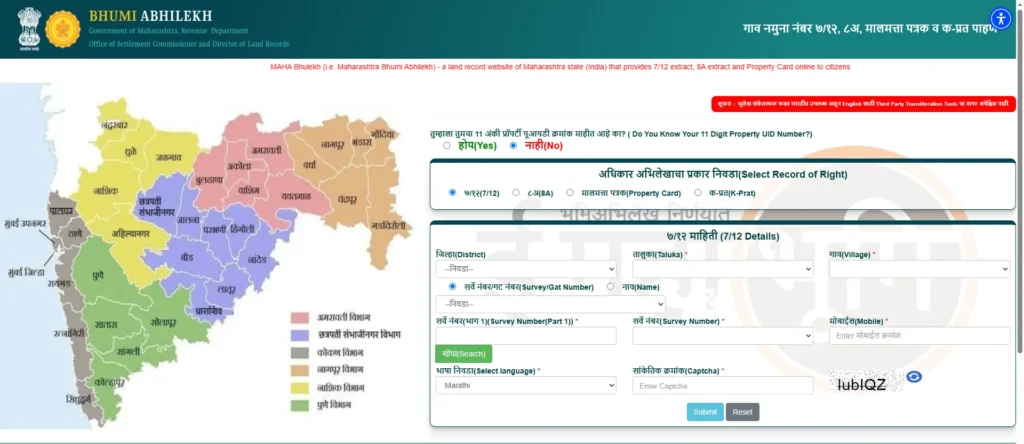
- Visit the Portal: Open your web browser and go to
bhulekh.mahabhumi.gov.in. - Select Your Region: Choose one of the six administrative divisions from the dropdown menu (Amravati, Aurangabad, Konkan, Nagpur, Nashik, or Pune) and click “Go”.
- Enter Location Details: Select your specific District, Taluka (sub-district), and Village from the menus.
- Search the Database: You can search for the record using the Survey Number/Gat Number, a Property UID, or by entering the first, middle, or last name of the owner.
- View the Extract: Complete the CAPTCHA verification to view your 7/12 extract on the screen.
How to Get a Digitally Signed 7/12 Extract (digitalsatbara.mahabhumi.gov.in)
For official purposes—such as property registration, bank loan applications, or court submissions—you must use a digitally signed 7/12 extract online. The Maharashtra government has granted these digital records full legal status, meaning you no longer need a physical stamp from a revenue officer.
- Log In: Visit
digitalsatbara.mahabhumi.gov.inand log in using your registered mobile number and OTP (or register as a new user). - Recharge Your Account: Click on the “Make Online Payment” tab to pre-fund your account wallet. You can add any amount between Rs. 15 and Rs. 1,000.
- Locate the Property: Select your District, Taluka, and Village, then enter the Survey/Gat Number or ULPIN.
- Download and Verify: A fee of Rs. 15 will be deducted from your wallet. Your downloaded PDF will feature a scannable QR code and a unique 16-digit verification number to prove its authenticity.
Understanding Your Maharashtra Land Records
The term “7/12” comes from the fact that the document combines two historical revenue forms: Form 7 and Form 12. To make sense of your land record, you need to understand what each form dictates.
Form 7 (Ownership) vs. Form 12 (Agriculture)
Decoding Form 7 (Adhikar Abhilekh)
Village Form 7 is the primary “Record of Rights”. It provides a comprehensive look at the legal ownership and liabilities associated with the land parcel. When reading Form 7, pay attention to:
- Ownership Details: The names of all registered landholders and their respective shares.
- Occupancy Class: It defines the transfer rights. For example, Class 1 occupants can freely transfer agricultural land, while Class 2 occupants require government permission.
- Khata Number: The account number linking the owner to their tax obligations.
- Other Rights and Liabilities: This crucial section lists any pending bank mortgages, government loans, encumbrances, or ongoing legal court disputes.
Decoding Form 12 (Pikanchi Nondvahi)
Village Form 12 acts as an active agricultural and crop register. It is highly relevant for farmers seeking crop insurance or agricultural subsidies. It tracks:
- Crop Details: The specific varieties of crops cultivated and the area under crops.
- Irrigation Status: Whether the land is rain-fed or irrigated, along with the specific water sources used.
- Cultivability: Classifications detailing the total cultivable area versus non-cultivable (Pot Kharaba) land.
8A Extract vs. Property Card: What’s the Difference?
While the 7/12 extract is widely known, users often confuse it with the 8A extract or the Property Card.
The 8A Extract: The 8A extract is essentially a financial tax ledger. While a 7/12 extract focuses on a single physical plot of land, the 8A extract consolidates all the different land holdings a person owns within a specific village under a single Khata (account) number. It outlines the total tax assessed on these parcels and is frequently used to verify an individual’s total landholding during inheritance divisions or crop loan applications. You can download an 8A extract from Mahabhulekh by selecting the “8A” option and searching via your Khata number.
The Property Card (Malmatta Patrak): The 7/12 extract is designed strictly for rural and agricultural lands. If you are buying a flat, shop, or plot within urban city limits (under municipal jurisdiction), you need a Property Card. Instead of an agricultural survey number, urban properties are tracked using a City Title Survey (CTS) number. To get a digitally signed property card, you can use the Mahabhulekh portal, select the urban local body area, and search using your CTS number.
Frequently Asked Questions (FAQs)
Is an online 7/12 valid in court?
Yes. If you download the digitally signed 7/12 extract from the digitalsatbara.mahabhumi.gov.in portal, it holds full legal validity. It features a digital signature, a QR code, and a 16-digit verification number, making it perfectly acceptable for court submissions, property registrations, and bank loans. The free “view-only” version from the main Mahabhulekh site, however, is for informational purposes only.
How do I check my e-Ferfar mutation status?
Whenever land is sold or inherited, the ownership change must be recorded via a mutation (Ferfar). You can track this process online. When a registration occurs, a notice is posted on the digital village noticeboard called Aapli Chawadi. This begins a 15-day objection period. You can check the real-time status of your mutation application (whether pending or approved) using the e-Ferfar or Aapli Chawadi features on the Mahabhulekh platform.
Can I correct mistakes on my digital 7/12 extract?
Yes. If you spot a discrepancy between the online record and your old handwritten documents (such as a spelling mistake or incorrect land area), you can apply for an online correction. You must register on the bhumiabhilekh.maharashtra.gov.in portal through the e-Hakk system and upload a scanned copy of your old manual 7/12 to support your correction request.