
Introduction: The Digital Transformation of Bihar Land Records
As of January 1, 2026, the Revenue Administration in Bihar has reached a definitive “hard reset.” Under the National Land Record Modernisation Programme (NLRMP), the state has concluded its transition to a “Digital Bihar” framework. For real estate professionals and landowners, this milestone is absolute: physical certified copies of land records are no longer issued or accepted by courts, banks, or registration offices.
This digital overhaul was designed to instill transparency and eliminate the pervasive influence of middlemen across all 38 districts. By mandating that only digitally signed documents hold legal validity, the government has streamlined Title Verification and narrowed the window for fraudulent claims. For any stakeholder in the Bihar real estate market, mastering these digital portals is no longer optional—it is a prerequisite for legal due diligence.
Key Portals for Bihar Land Management
The ecosystem of Bihar’s land administration is divided into three primary digital touchpoints. Understanding the distinction between operational records and historical registration is critical for accurate property assessment.
Primary Land Record Portals in Bihar
| Portal Name | Official URL | Primary Services Offered |
| Bihar Bhumi | biharbhumi.bihar.gov.in | Current operational records: Jamabandi register, Online Mutation (Dakhil Kharij), LPC applications, and Bhu Lagan (Land Tax). |
| Bhumi Jankari | bhumijankari.bihar.gov.in | Historical property registration, deed searches (pre-2024), and Market Value Rate (MVR) inquiries. |
| eNibandhan | enibandhan.bihar.gov.in | Critical User Alert: Access to certified copies of documents registered after 16th December 2024. |
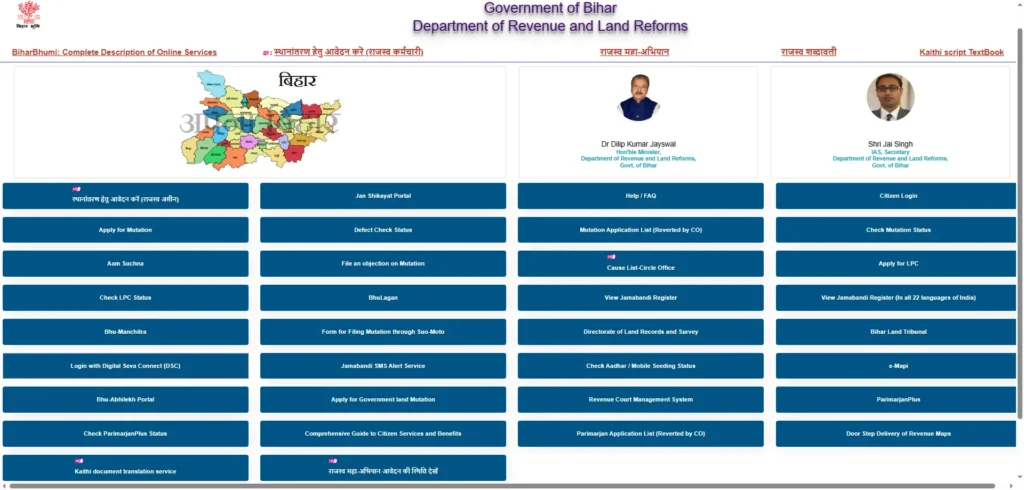
How to Check Bihar Bhulekh (Land Records) Online
Navigating the Record of Rights (RoR) requires precision. Users can verify title details through the following government channels:
Checking Details via land.bihar.gov.in
- Access the main Revenue and Land Reforms Department gateway.
- Utilize the interactive district map to select your specific region.
- Drill down into the secondary map to locate the relevant village (Mauja).
- Apply search parameters: View all accounts by Mauja name, Khasra number, specific Account Number, or Account Holder Name.
- Execute ‘Search Account’ to generate the digital record.
Checking Details via biharbhumi.bihar.gov.in
- Navigate to the portal and select ‘View Jamabandi Register’.
- Use the ‘Public Login’—new users must complete a one-time registration.
- Select the District, Circle, and Mauja from the dropdown menus.
- Input the Khata or Khasra number to retrieve the specific digital entry.
Advance Search: Accessing Historical Property Registration
For comprehensive Title Verification, the “Advance Search” feature on the Bhumi Jankari portal is the industry standard. It allows for the reconstruction of a property’s “Title Chain” spanning up to 50 years.
Search Timeframes
Users must categorize their search within three distinct technological eras:
- Online Registration (2016 to Present): This is the most robust category. It is the only timeframe that consistently provides a downloadable Web Copy with immediate legal standing for court and bank use.
- Post Computerisation (2006 to 2015).
- Pre Computerisation (Before 2005).
Key Search Filters
To ensure successful retrieval—especially when party names are common or misspelled—users should prioritize the following filters:
- Registration Office: The specific Sub-Registrar Office (SRO).
- Document Identifiers: Deed Number or Serial Number (often the most accurate way to locate a unique record).
- Party Name: Search by Executant (Seller) or Claimant (Buyer).
- Land Identifiers: Khesra (Plot Number) or Khata Number.
- Date Range: Specific ‘From’ and ‘To’ registration dates.
Dakhil Kharij (Online Mutation) Process
In Bihar’s Revenue Administration, Dakhil Kharij (Mutation) is the process by which land ownership is formally transferred in the government’s records. A Sale Deed proves a transaction, but only a Mutation entry in the Jamabandi register confirms legal title in the eyes of the state.
The 8-Step Mutation Workflow
- Log in to the Bihar Bhumi portal and select ‘Apply Online Mutation’.
- Authenticate via the login dashboard.
- Choose the District and Circle, then select ‘Apply New Mutation’.
- Input detailed property and party information.
- Upload a clear PDF of the registered Sale Deed.
- Remit the one-time mutation fee through the integrated payment gateway.
- Obtain the unique transaction number for status tracking.
- The Circle Officer (CO) reviews the application; if no issues are found, the certificate is typically issued within 15–30 days.
Filing Objections
If a party disputes a mutation request, an objection must be filed online. Per current governance standards, the Circle Officer is mandated to dispose of these objection cases within 60 working days.
Parimarjan: Correcting Errors in Digital Records
The Parimarjan Plus workflow is the primary mechanism for rectifying data mismatches (e.g., discrepancies in names, land area/Rakba, or Khata/Khesra numbers) between a physical deed and the digital database.
Workflow and Session Security
- Log in using a mobile number and OTP. Note: Ensure this mobile number remains active and reachable; the Parimarjan Plus workflow requires session persistence, and timing out may require a complete restart of the application.
- Select ‘Post Your Application’ and identify the land via the Jamabandi number.
- Select the specific correction category (e.g., Correction in Name or Land Area).
Documentation Requirements
Users must upload a single merged PDF containing:
- The notarized Correction Affidavit.
- The original registered Sale Deed.
- A valid ID proof of the applicant.
- Tracking: Always retain the Acknowledgement Receipt (Paawati) to monitor the status of the rectification.
Land Possession Certificate (LPC) and Bhu Lagan
Land Possession Certificate (LPC)
An LPC is the definitive proof of current possession and ownership, essential for securing agricultural bank loans or satisfying legal due diligence. Application is handled via the Bihar Bhumi portal under the ‘Online LPC Application’ tab, typically cross-referenced with the Jamabandi entry.
Bhu Lagan (Land Tax)
Landowners can settle their annual revenue obligations via the “Bhu Lagan” portal. To initiate payment, users must provide the following parameters from the Jamabandi Register:
- Bhag Vartaman (Part Number)
- Prishth Sankhya (Page Number)
Failed Transaction Management: If funds are debited without a receipt being generated, users should immediately utilize the ‘Failed Transaction Status’ tool. By entering the Transaction ID, the system will verify the payment status and reconcile the record.
Recent Reforms and Innovative Initiatives
- Door-to-Door Land Record Update: Launched in August 2025, this initiative involves revenue officers visiting homes to verify titles and settle boundaries. A specific focus was placed on Mahadalit Tolas to resolve long-standing disputes and ensure marginalized communities receive clear legal titles.
- Drone-Based Cadastral Mapping: Precise digital boundaries are now established via drone surveys, effectively mitigating illegal land claims and boundary overlaps.
- Digitisation Drive (January 1st, 2026):
- Title Validity: Only digitally signed copies of Jamabandi and Khatiyan are recognized for legal or financial transactions.
- Judicial/Banking Acceptance: Physical certified copies are no longer accepted for bank loans or court proceedings.
- Direct Revenue Administration: The “Anchal” office no longer issues paper-based copies, eliminating the need for intermediaries.
BhuNaksha Bihar: Navigating Cadastral Maps
Developed by the National Informatics Centre (NIC), BhuNaksha allows for the visualization of land parcels. These digitized maps are integrated with the textual Record of Rights (ROR).
Available Survey Layers
- Special Survey (Current ongoing accuracy drive)
- Revisional Survey
- Cadastral Survey
- Chakbandi (Land Consolidation) Survey
Contact Information and Support
For professional assistance regarding digital revenue services, contact the Department of Revenue and Land Reforms:
- Headquarters: Old Secretariat, Bailey Road, Patna – 800015
- Toll-Free Support: 18003456215
- Official Support Email: emutationbihar@gmail.com
Frequently Asked Questions (FAQs)
How far back can I search for documents using Advance Search?
The portal generally supports historical searches up to 50 years, provided the district’s records have been fully digitized.
Which portal should I use for a property bought in 2025?
For any document registered after December 16, 2024, you must use the eNibandhan portal (enibandhan.bihar.gov.in) to obtain certified copies.
What is the legal standing of a ‘Web Copy’?
A Web Copy obtained via the Online Registration (2016-Present) timeframe is a government-certified duplicate and holds full legal validity for title verification, bank loans, and court evidence.
What does MVR mean?
MVR stands for Market Value Rate. It is the government-mandated minimum valuation for land in a specific area, used to determine stamp duty during registration.
How long does mutation take if an objection is filed?
While a standard mutation takes 15–30 days, a contested mutation requires the Circle Officer to resolve the objection within 60 working days.
Can I find land details using only a Plot Number?
Yes, the Advance Search feature allows the Plot Number (Khesra Number) to be used as a primary search parameter.