Navigating agricultural and non-agricultural land records in Telangana has undergone a massive transformation. For years, citizens and farmers navigated the Dharani portal, a system that, while well-intentioned, often led to operational deadlocks and frustration. To resolve these issues, the state government has officially launched the Bhu Bharati Portal Telangana, a comprehensive, decentralized, and highly transparent Integrated Land Records Management System.
Backed by the Telangana Bhu Bharati (Record of Rights in Land) Act, 2024/2025, this new system is designed to put control back into the hands of landowners. Whether you are a farmer looking to check your Record of Rights (RoR), an NRI verifying property details from abroad, or a buyer applying for land mutation, this complete guide covers everything you need to know about the new land records system.
What is the Bhu Bharati Portal?
The Bhu Bharati portal is the official digital platform for land administration and revenue services in Telangana. It acts as a single source of truth for property data, integrating land ownership records with geo-referenced mapping. The portal was introduced following the passage of the Telangana Bhu Bharati (Record of Rights in Land) Bill, 2024, which legally replaced the controversial Dharani system.
The primary objective of the portal is to address the shortcomings of previous systems by providing a simplified, user-friendly platform that protects land rights, streamlines mutations, and establishes a secure digital framework for both agricultural and non-agricultural lands.
Dharani vs. Bhu Bharati: Key Differences
If you are accustomed to the old system, understanding the transition from Dharani to Bhu Bharati is crucial. The Dharani portal had 33 complex modules, which often confused farmers and required them to pay fees repeatedly to raise queries. Bhu Bharati has dramatically reduced this cognitive load by condensing the system into just 6 simplified modules.
The most significant difference lies in decentralization and error correction. Under Dharani, local officials were stripped of administrative editing rights. This meant that if a farmer had a minor spelling mistake or an incorrect land measurement in their passbook, they were forced to endure costly and time-consuming civil court battles to fix it. Bhu Bharati changes this completely. The new system decentralizes power, allowing local Tahsildars and Revenue Divisional Officers (RDOs) to handle ROR corrections directly, keeping minor disputes out of the courts. Furthermore, Bhu Bharati removed the “hidden” option found in Dharani, ensuring that land details cannot be concealed and remain accessible for transparent verification.
Key Features and Benefits of Bhu Bharati
The Bhu Bharati system is not just a software update; it is a structural overhaul of land governance in Telangana. Here are the standout features that benefit buyers, sellers, and farmers:
The Unique Bhudhaar ID System
Just as citizens have an Aadhaar card, every parcel of land in Telangana will now receive a digital fingerprint known as a Bhudhaar ID. The Bhu Bharati Act mandates that land parcels be assigned either a “Temporary Bhudhaar” (if geo-referencing is not yet complete) or a “Permanent Bhudhaar” once the land boundaries and coordinates are fully mapped using GIS technology. This digital footprint links directly with the Record of Rights (RoR), making land boundaries mathematically precise, preventing encroachments, and drastically reducing boundary disputes.
Regularisation of Sada Bainama
For decades, many small and marginal farmers bought and sold land using “Sada Bainama”—informal, unregistered agreements executed on plain paper. Under Bhu Bharati, the government has provided a pathway to regularize these unregistered transactions. If a small or marginal farmer acquired agricultural land through a Sada Bainama before June 2, 2014, and can prove possession for over twelve years, they can apply through the Revenue Divisional Officer to have the transaction legally formalized and certified.
Free Legal Aid for Farmers
Land disputes can financially devastate rural families. To combat this, the Bhu Bharati Act introduces a revolutionary welfare measure: the provision of free legal services. The government will appoint volunteers and provide legal representation for small and marginal farmers who cannot afford to file appeals before Land Tribunals or appellate authorities, ensuring equal access to justice against large landlords or corporations.
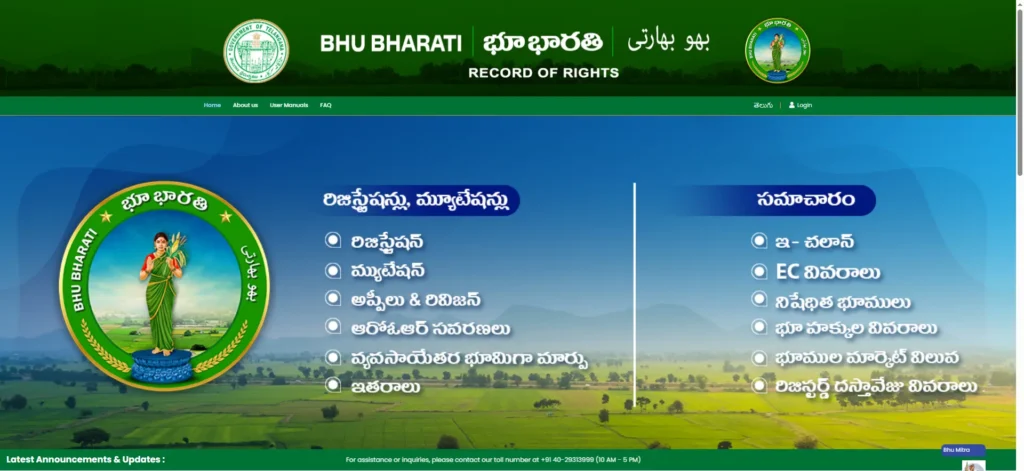
How to Use the Bhu Bharati Portal (Step-by-Step)
The portal is designed for citizens, NRIs, and institutions to self-manage their property needs without relying on middlemen. Here is a practical guide on how to navigate the platform.
How to Register and Login
To access transactional services, you must create an account.
- Visit the official website:
bhubharati.telangana.gov.in. - Click on the Login button at the top right of the homepage.
- Select your role (Citizen, NRI, Bank, or Organisation).
- Click on Signup, enter your name, mobile number, and email ID, and verify your identity using the OTP sent to your phone. The system also utilizes Aadhaar-based e-KYC for enhanced security.
- Pro Tip: Always use a single, permanent mobile number for all your land-related work to avoid OTP mix-ups and keep your transaction history linked seamlessly.
Searching for Land Details (RoR 1B & Pahani)
The Record of Rights (RoR) 1B and the Pahani are the ultimate proofs of ownership and possession in Telangana. Without your name accurately reflected in the RoR 1B, you cannot legally sell your land, mortgage it, or receive benefits like Rythu Bandhu.
To check these records:
- Log in to the portal and navigate to the Information Services section.
- Click on Land Details Search.
- You can search by entering the exact Survey Number, Sub-Division Number, or Pattadar Passbook Number. Alternatively, you can select your District, Mandal, and Village from the dropdown menus.
- Click Fetch Details to instantly view the owner’s name, land extent, classification (e.g., wet or dry), and market value.
Downloading Encumbrance Certificates (EC)
An Encumbrance Certificate (EC) is a non-negotiable document before buying any property. It lists all registered transactions, such as sales, gifts, or mortgages, over a specific period, proving whether a property has a clear title.
To pull an EC:
- Access the Encumbrance Details module under Information Services.
- Input your district, mandal, village, survey/khata number, and the specific date range you wish to search (a 30-year search is highly recommended for thorough due diligence).
- Pay the nominal fee and download the digitally signed PDF.
Additionally, you must always check the Prohibited Properties (Section 22A) List on the portal. Section 22A prohibits the sale of government land, Wakf property, Endowment land, and assigned lands. Buying a parcel on this list is illegal and will render your registration void. You can search this list by village or survey number to ensure the land is safe to purchase.
Applying for Land Mutation and NALA
Mutation is the process of updating revenue records to reflect the new owner after a property is sold, gifted, or inherited. The great news for buyers of agricultural land in Telangana is that mutation is now an automatic process that triggers instantly upon registration. However, for successions (inheritance) or court-ordered transfers, you must apply manually through the portal’s Mutation Module by uploading death certificates, legal heir proofs, and paying the requisite fee via e-challan.
If you plan to use agricultural land for residential or commercial purposes, you must apply for NALA (Non-Agricultural Land Assessment) conversion.
- Select the NALA Application module under Transactional Services.
- Enter your Pattadar Passbook Number and select the land extent you wish to convert.
- Upload supporting documents like your title deed and layout plan.
- Pay the NALA fee (which generally ranges from Rs. 5,000 to Rs. 20,000 depending on the area and classification).
- Book a slot for physical verification by the Tahsildar.
Frequently Asked Questions (FAQs)
Is the Dharani portal still working in Telangana?
No. Dharani has been entirely replaced by the Bhu Bharati portal. All historical data from Dharani has been securely migrated, and all land-related services must now be accessed through Bhu Bharati.
How do I correct a wrong name or extent in my passbook?
Log in to Bhu Bharati and navigate to “ROR Corrections” under Transactional Services. Select “Application for Passbook Data Correction,” choose the type of correction (Name, Land Nature, or Extent), and upload proof documents like your Aadhaar or previous title deeds. The application will be routed to local revenue officials for verification.
What are the fees for services on the Bhu Bharati portal?
The government has standardized fees to prevent exploitation by middlemen. Registration fees generally range from Rs. 100 to Rs. 500, mutation fees from Rs. 200 to Rs. 1,000, and ROR corrections from Rs. 100 to Rs. 500. Document downloads (like an EC or RoR) cost between Rs. 20 and Rs. 100 per document.
Can NRIs use the Bhu Bharati portal?
Yes. The portal features a dedicated NRI workflow that utilizes e-KYC options, allowing non-residents to apply for passbooks, check mutations, and manage their properties remotely without needing to visit a government office in person.