Navigating property ownership in Odisha has shifted from dusty record rooms to instant digital access. Whether you are a first-time homebuyer in Bhubaneswar or an investor eyeing farmland in Ganjam, understanding the Bhulekh Odisha portal is your first line of defense against fraud.
What is Bhulekh Odisha?
Bhulekh Odisha is the official web-based platform designed by the Government of Odisha’s Revenue and Disaster Management Department to provide transparent access to land records. The portal serves as a centralized database for the entire state, covering all 30 districts and over 300 Tahasils.
The portal’s primary function is hosting the Record of Rights (RoR), locally known as the Khatiyan. This legal document acts as a certificate of land ownership, detailing who owns the plot, its exact area, land classification, and any existing liabilities or dues.
How to View Bhulekh Odisha RoR Online (Step-by-Step)
The portal is designed for high-volume navigational intent, allowing you to find records in minutes.
Step 1: Access the Official Portal
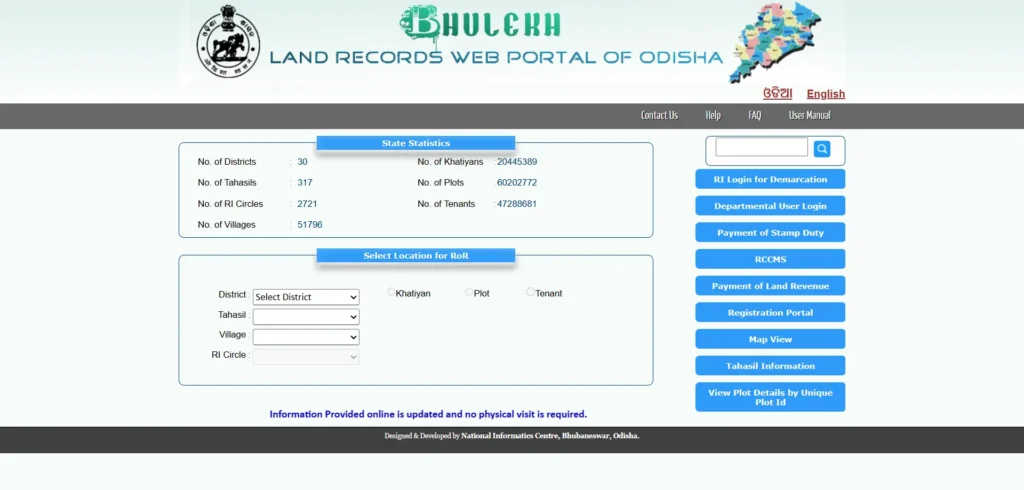
Visit the authorized government site at bhulekh.ori.nic.in.
- Pro Tip: Be wary of third-party apps; always verify data against this official URL.
Step 2: Select Your Location
On the homepage, you must select your specific jurisdiction from the dropdown menus:
- District (e.g., Khordha, Cuttack, or Puri).
- Tahasil (the sub-district administrative unit).
- Village (Mouza) (the smallest land unit).
- RI Circle (a cluster of villages under one Revenue Inspector).
Step 3: Choose Your Search Method
You can retrieve land details using one of three primary methods:
1. Search by Khatiyan Number
The Khatiyan (or Khata number) is a unique account number identifying an owner-family’s full land holdings within a specific village. This is the most precise method if you already have your property documents.
2. Search by Plot Number
A Plot Number identifies a specific, individual parcel of land. This is ideal for buyers who want to verify the exact piece of land they are inspecting on the ground.
3. Search by Tenant (Owner) Name
If you don’t have the Khata or Plot numbers, you can search by the Raiyat (Owner) Name.
- Note: “Land record search by name in Odisha” is a high-volume query. Use multiple spelling variants (e.g., “Mishra” vs. “Misra”) as Odia-to-English transliterations often vary.
Step 4: View and Download ROR
Once you select a record, choose “ROR Front Page” or “ROR Back Page” to view the full document. You can take a printout or save it as a PDF for personal reference.
Advanced Security: Smart RoRs and QR Codes (2026 Update)
In February 2026, Odisha took a “massive leap” into digital security by launching Smart Records of Rights. This update, announced by Revenue Minister Suresh Pujari, replaces vulnerable paper Pattas with high-tech ownership documents.
Instant QR Verification
Every new Smart RoR features a unique QR code. By scanning this with a smartphone, buyers or bank managers can instantly see decades of transaction history, plot dimensions, and boundary maps directly from the government database.
Tamper-Proof Electronic Chips
These documents are embedded with electronic security chips. Any unauthorized attempt to alter the physical document or its digital twin triggers an automatic alert to the local Tahasildar and Revenue Inspector.
Critical Verifications Before Buying Land in Odisha
Relying solely on a clean-looking online screen is “financial suicide”. You must dig into the underlying legal framework.
Sabik vs. Hal Khata: The Historical Blind Spot
In Odisha, land records are divided into eras:
- Sabik Khata: Older settlement records (pre-1970s).
- Hal Khata: Current modernized records visible on Bhulekh.
The Risk: During the transition, “clerical errors” sometimes dropped co-owners or ignored secret mortgages. Verification Tip: Always trace the lineage backward from Hal to Sabik to ensure an unbroken chain of title.
The SRO-Tahasildar Mutation Pipeline
A major vulnerability is the latency window. When you register a sale at the Sub-Registrar Office (SRO), your Encumbrance Certificate (EC) updates instantly. However, the Mutation (officially changing the name on Bhulekh) can take 90 to 180 days.
- Double-Sale Fraud: Scammers exploit this gap by selling the same plot to multiple buyers before the portal updates. The Solution: Physically check the Tahasildar’s office for any “Form 6” mutation applications pending on the plot.
Checking OLR Section 22 Restrictions
Section 22 of the Odisha Land Reforms (OLR) Act strictly prohibits the transfer of land belonging to Scheduled Tribes (ST) to non-tribals without explicit, written permission from the District Collector. Buying such land without approval makes the sale “void ab initio” (invalid from the start), meaning you lose both the land and your money.
The 2025 Kisam and Satwa Reforms
To simplify administration, the government consolidated thousands of legacy terms in June 2025.
- 22 Standardized Kisams: Land types are now grouped into 22 categories (e.g., Gharabari for residential, Byabasaika for commercial).
- 4 Standardized Satwas: Ownership rights were unified into 4 categories, with Raiyati / Sthitiban being the strongest individual title.
Other Important Land Portals in Odisha
For full due diligence, you must use these specialized portals alongside Bhulekh.
Bhu Naksha Odisha
Accessible at bhunakshaodisha.nic.in, this is the cadastral map layer. While Bhulekh tells you who owns the land, Bhu Naksha shows you where it is and its exact shape.
- Key Search: Bhu Naksha only searches by Plot Number.
IGR Odisha (Registration & Valuation)
The Inspector General of Registration portal (igrodisha.gov.in) is used for:
- Benchmark Valuation: Finding the government-fixed floor price (circle rate).
- Stamp Duty Calculator: Estimating registration costs (generally 7% of property value for males, 6% for females).
- Encumbrance Certificate (EC): Obtaining a 30-year record of registered transactions.
e-Pauti Odisha
Visit odishalandrevenue.nic.in to pay your annual land tax (Khajana) online. A Pauti (receipt) is an essential document for proving current possession during loan applications.
Common Bhulekh Odisha Troubleshooting
“Record Not Found” Solutions
- Check Spelling: Revenue records often use phonetic Odia spellings.
- Odia Font: You may need to download the specialized Odia font from the portal’s footer to view text properly on some browsers.
- Sabik/Hal Mismatch: Your paper Patta might have an old Sabik number that hasn’t been digitized yet.
How to Correct Errors in RoR
If your name is misspelled or the land area is wrong, apply to the local Tahasildar under Section 22 of the Odisha Survey & Settlement Act.
- Required Docs: Aadhaar, old RoR copies, and a supporting affidavit.
- Timeline: Field verification by the Revenue Inspector (RI) and final approval typically take 30 to 60 days.