The digitization of land administration in Gujarat has transformed how property owners, buyers, and developers interact with the Revenue Department. Through the AnyRoR (Any Record of Rights Anywhere) portal, the state has eliminated the need for physical visits to government offices for basic record viewing, introducing a level of transparency and speed previously unavailable. This guide provides a deep dive into using the system for title verification, loan preparation, and legal due diligence.
What is AnyRoR (Any Record of Rights Anywhere)?
AnyRoR is the official web-based interface managed by the Revenue Department of Gujarat. It serves as the front-end portal for citizens to access the “Record of Rights” (RoR) for both rural and urban land parcels. The platform is part of a larger e-governance initiative designed to provide read-only access to land data, allowing users to verify ownership, check for encumbrances, and track the status of property mutations.
Types of Gujarat Land Records Available on AnyRoR
Understanding the specific forms is critical for legal and financial transactions. The portal categorizes records based on their function in the land revenue system.
VF-7 and VF-12 (7/12 Utara/Satbara Utara)
The 7/12 Utara is perhaps the most requested document on AnyRoR. It is a combination of two distinct village forms:
- VF-7: Details the ownership rights, including names of the owners and any active liabilities or mortgages on the property.
- VF-12: Provides cultivation data, showing the crops grown, irrigation sources, and the nature of the agricultural land.
VF-8A (Khata Details)
The VF-8A is a consolidated ledger of all land holdings registered under a specific “Khata” or account number. While the 7/12 focuses on a single survey number, the 8A shows a landholder’s entire agricultural footprint within a village, making it essential for verifying overall collateral for retail home loans.
VF-6 (Mutation Register) and 135-D Notices
The VF-6 tracks every change in ownership or rights, including inheritance, sales, and gifts. When a mutation is initiated via the e-Dhara system, a 135-D notice is issued to all interested parties to allow for objections. Tracking the “VF-6 mutation status” is a key transactional search intent for post-sale monitoring.
Urban Property Cards (City Survey)
For land within municipal limits or “City Survey” areas, the rural extracts are replaced by Urban Property Cards. These cards detail the sheet number, ward number, and ownership specifics of urban plots.
How to Check AnyRoR Land Records: Step-by-Step
The portal is designed for ease of use, offering multiple search filters to accommodate users who may only have partial information.
Viewing Rural Land Records
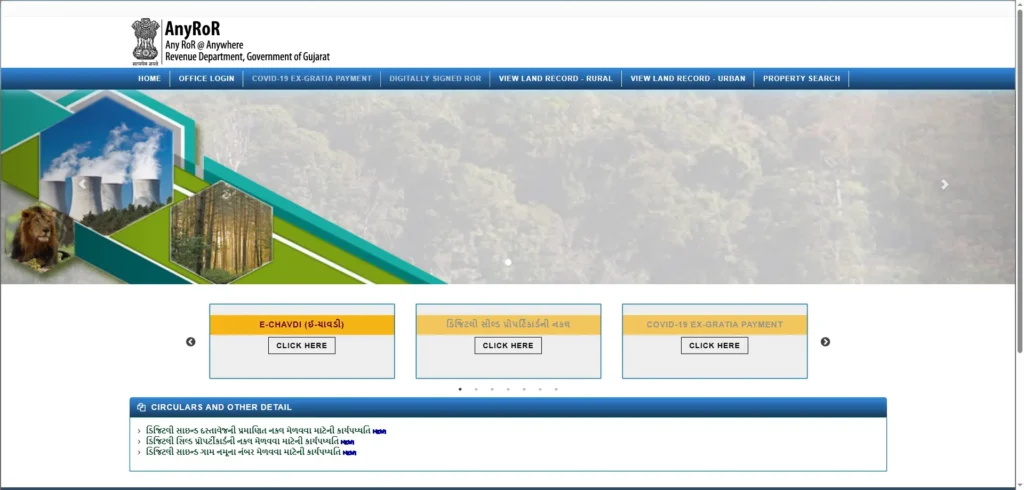
- Navigate to the official AnyRoR website.
- Select the option “View Land Record – Rural”.
- Choose the record type you need (e.g., VF-7 Survey Details or 8A Khata Details).
- Select your District, Taluka, and Village from the drop-down menus.
- Enter the Survey Number or Khata Number.
- Solve the captcha and click “Get Record Detail”.
Viewing Urban Land Records
- Select “View Land Record – Urban” on the homepage.
- Input the City Survey Office relevant to your property.
- Choose the Ward and Sheet Number.
- Enter the Plot Number to view the Property Card.
AnyRoR Property Search by Name
If you do not know the survey number, you can perform a “Know Owner Name” or “Name Wise” search. This is an “investigation” intent tool used by buyers to verify if a target name is legitimately linked to specific titles. After selecting the district/village, enter the owner’s name to find corresponding survey numbers.
AnyRoR Free View vs. iORA Certified Copies
It is vital to distinguish between information and legal validity.
- AnyRoR (Free View): The records displayed here are for informational purposes only. They are suitable for personal verification but are not accepted by courts or for formal bank loan processing.
- iORA (Digitally Signed RoR): To obtain a legally valid document, users must use the Integrated Online Revenue Applications (iORA) portal. iORA provides certified, digitally signed copies of the RoR that can be used for official and legal purposes.
The Role of e-Dhara in the AnyRoR Ecosystem
While AnyRoR is the public face, e-Dhara is the backend data management system that powers it. e-Dhara was implemented to digitize land records across over 18,000 villages, replacing manual ledgers with a secure, centralized database. It manages the workflow for mutation entries (VF-6), ensuring that any change in ownership is systematically recorded and updated in the live VF-7 data.
Troubleshooting Common AnyRoR Issues
“Record Not Found” and Survey Mismatches
If a survey number does not appear, check for spelling errors or ensure you have selected the correct village under its current taluka. If the data is missing or incorrect, you must contact the local Mamlatdar or Talati to verify the backend entry in the e-Dhara center.
Right-Click and Printing Issues
The AnyRoR portal often disables right-click functionality to protect data. To print your record, use the browser shortcut Ctrl + P. Ensure your pop-up blocker is disabled, as the record detail view often opens in a new tab.
Frequently Asked Questions About AnyRoR
Is the free AnyRoR download valid for bank loans?
No, banks typically require a digitally signed, certified copy from the iORA portal or an e-Dhara center for mortgage underwriting.
How often are records updated on the portal?
Records are updated in real-time as mutation entries are certified through the backend system.
Is there an official AnyRoR mobile app?
While third-party apps exist, users are encouraged to use the official responsive web portal to ensure data security and accuracy.